

Features
Everything Signal does, in the order a deal moves.
Find who to call, reach them, close the work and run the team, in one system rather than five. Open any area below to see the tabs inside it, a real screen, and everything it includes.
14 days free. No credit card.
- 14 days free
- No credit card
- Unlimited users
Explore Empiraa Signal
Every part of the app, area by area.
Pick an area to see the tabs inside it, a real screen from a working workspace, what sales teams use it for, and everything it includes.
myHub
Everyone opens on the work that needs them.
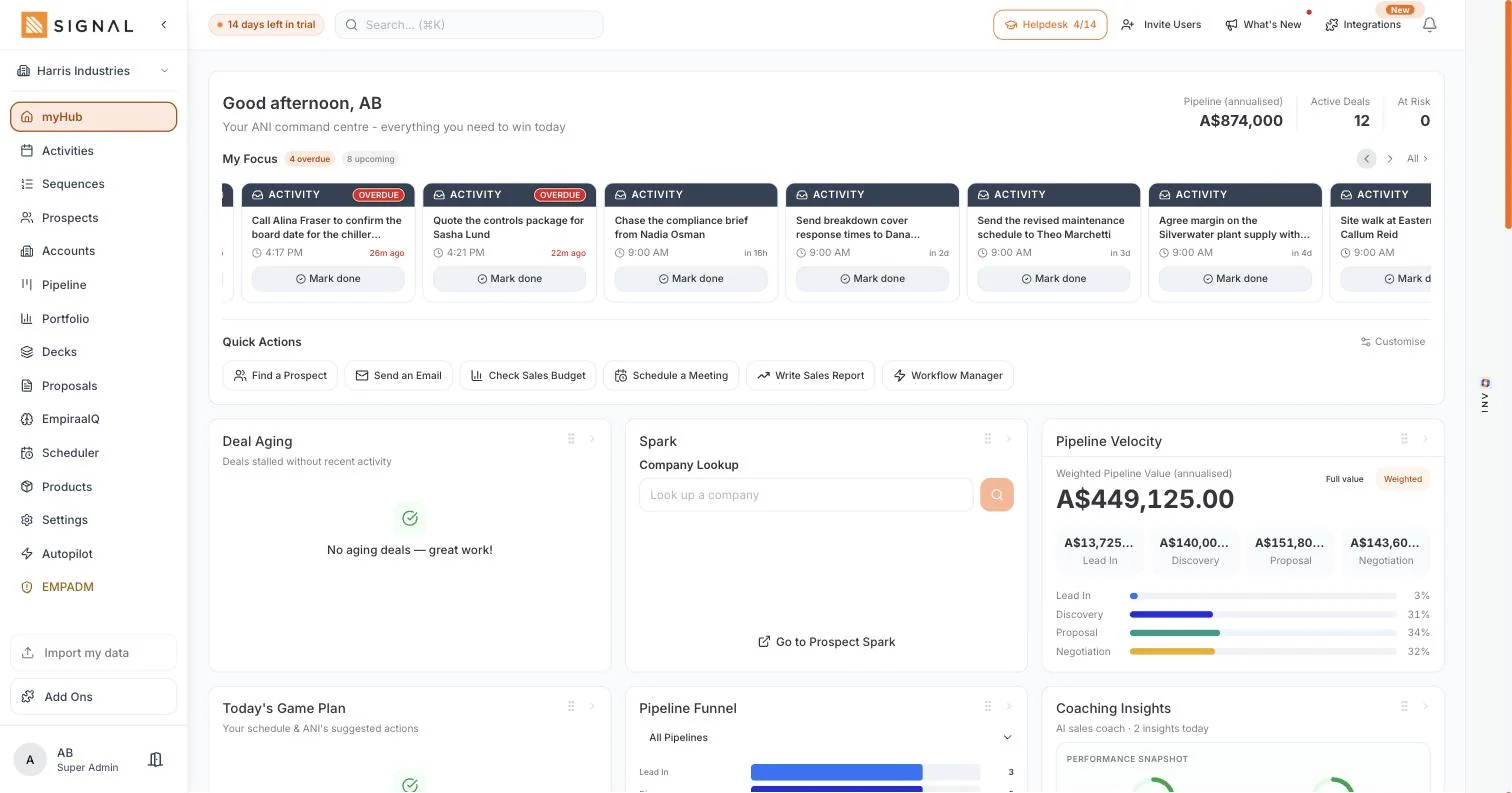
The home screen. Annualised pipeline, active deals and what is at risk across the top, then My Focus: the overdue and upcoming actions in the order worth working. Quick actions, deal aging, a company look up, pipeline velocity by stage and an ANI daily brief sit underneath.
What sales teams use it for
- First thing in the morningOverdue first, then today, in about thirty seconds.
- Before a call blockBuild a schedule with ANI, or work straight down My Focus.
- A quick check on the monthClosed won against forecast and best case, without opening a report.
Everything in myHub
- Annualised pipeline, active deals and deals at risk
- My Focus: overdue and upcoming actions, marked done from the row
- Quick actions you can customise: find a prospect, send an email, check the sales budget, schedule a meeting, write a sales report
- Deal aging, for deals stalled without recent activity
- Prospect Spark and company look up from the home screen
- Pipeline velocity: weighted value by stage, with the share each stage holds
- Today’s game plan, with ANI suggested actions and a schedule it can build
- Pipeline funnel by stage, across one pipeline or all of them
- Coaching insights, with win rate and pipeline coverage
- My KPIs by week, month or quarter, against closed won, forecast and best case
- Hot decks, ANI daily brief, deals needing attention and new prospects
- Quick stats over 7, 30 or 90 days, plus all-time totals
- Upcoming meetings booked through your scheduler, and stock alerts
Prospect Hub
Find who to call, before they are in the pipeline.
Where a lead lives before it becomes a deal. Prospect Spark finds companies that match your ideal customer, Look Up tells you about one you already have in mind, and the hub shows coverage and stage so nothing sits untouched.
Tabs in Prospect Hub
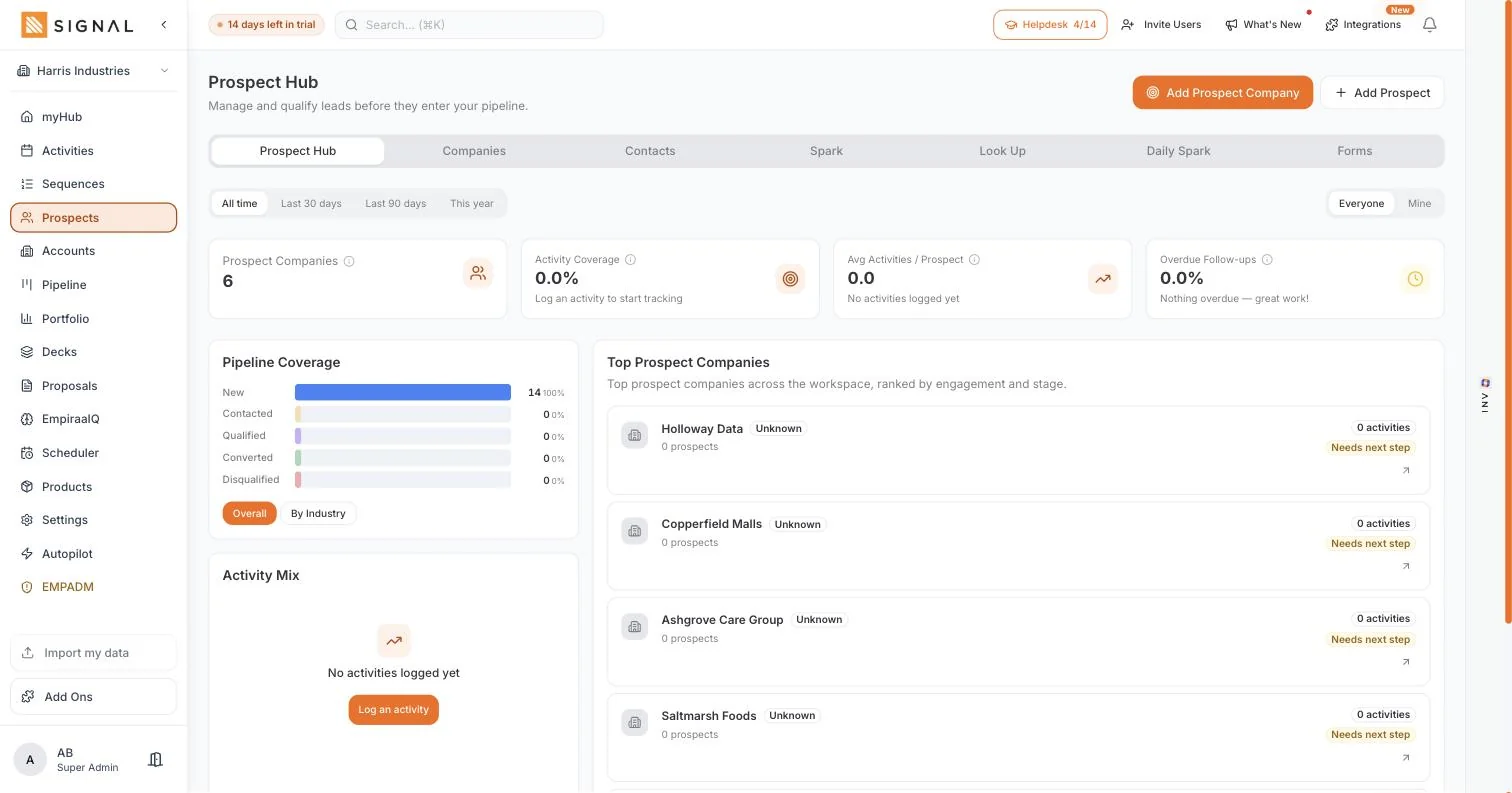
Prospect Hub: Prospect companies, activity coverage, pipeline coverage by stage and the top companies by engagement.
What sales teams use it for
- Filling the top of the funnelDescribe your ideal customer once and let matching companies arrive.
- Researching one companyLook it up, find the right job title, reveal the details and call.
- Checking nothing is stuckPipeline coverage by stage shows prospects sitting at New with no next step.
Everything in Prospect Hub
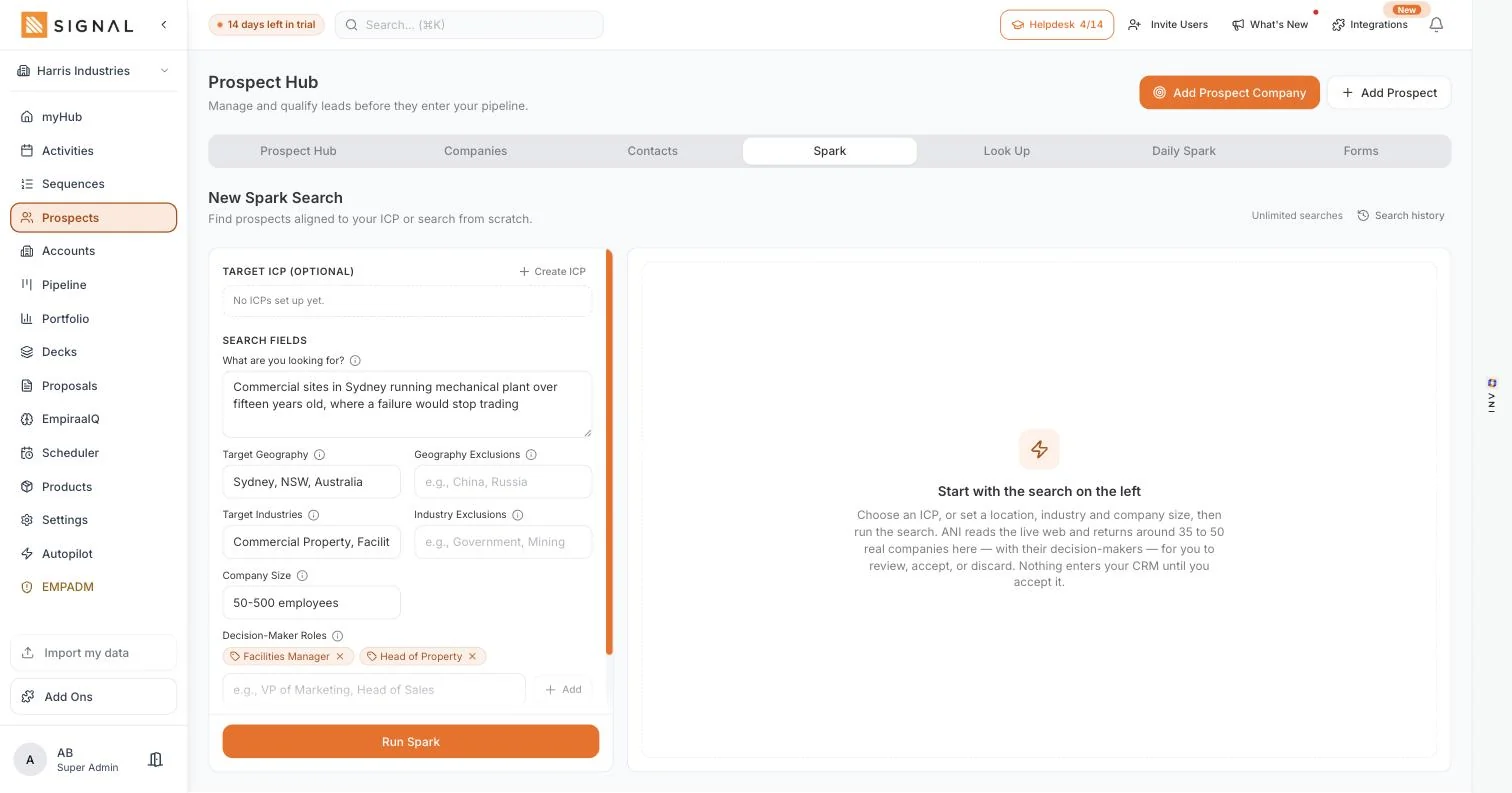
- Prospect Spark: describe your ideal customer in plain words and get matching companies
- Target geography, industries, company size and decision-maker roles on a search
- Daily Spark, a standing search that keeps bringing companies in
- Company look up for a business you already have in mind
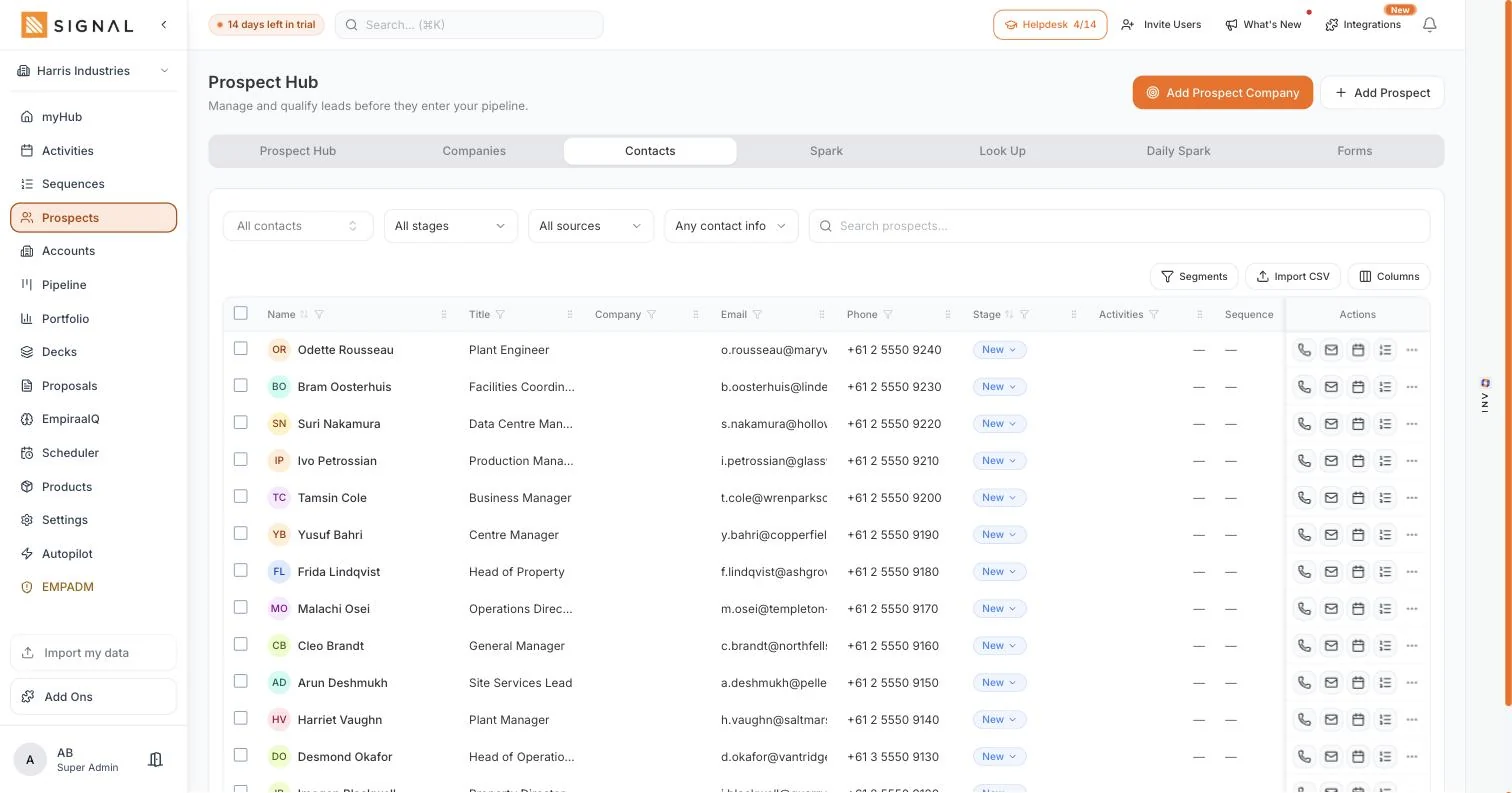
- Contact reveal for email and phone, saved onto the record
- Prospect companies and prospect contacts as separate lists
- Stages from new through contacted, qualified, converted and disqualified
- Activity coverage, average activities per prospect and overdue follow-ups
- Pipeline coverage by stage, and an activity mix breakdown
- Top prospect companies ranked by engagement and stage
- Capture forms, so an enquiry arrives as a prospect
- Call, email, book a meeting or enrol in a sequence from the row
Accounts
The whole relationship, not just the last email.
Every company you deal with and the people inside it, with the calls, emails, meetings, deals, decks and proposals attached. The hub adds the number most growing teams have never had: what share of the base anyone has actually touched.
Tabs in Accounts
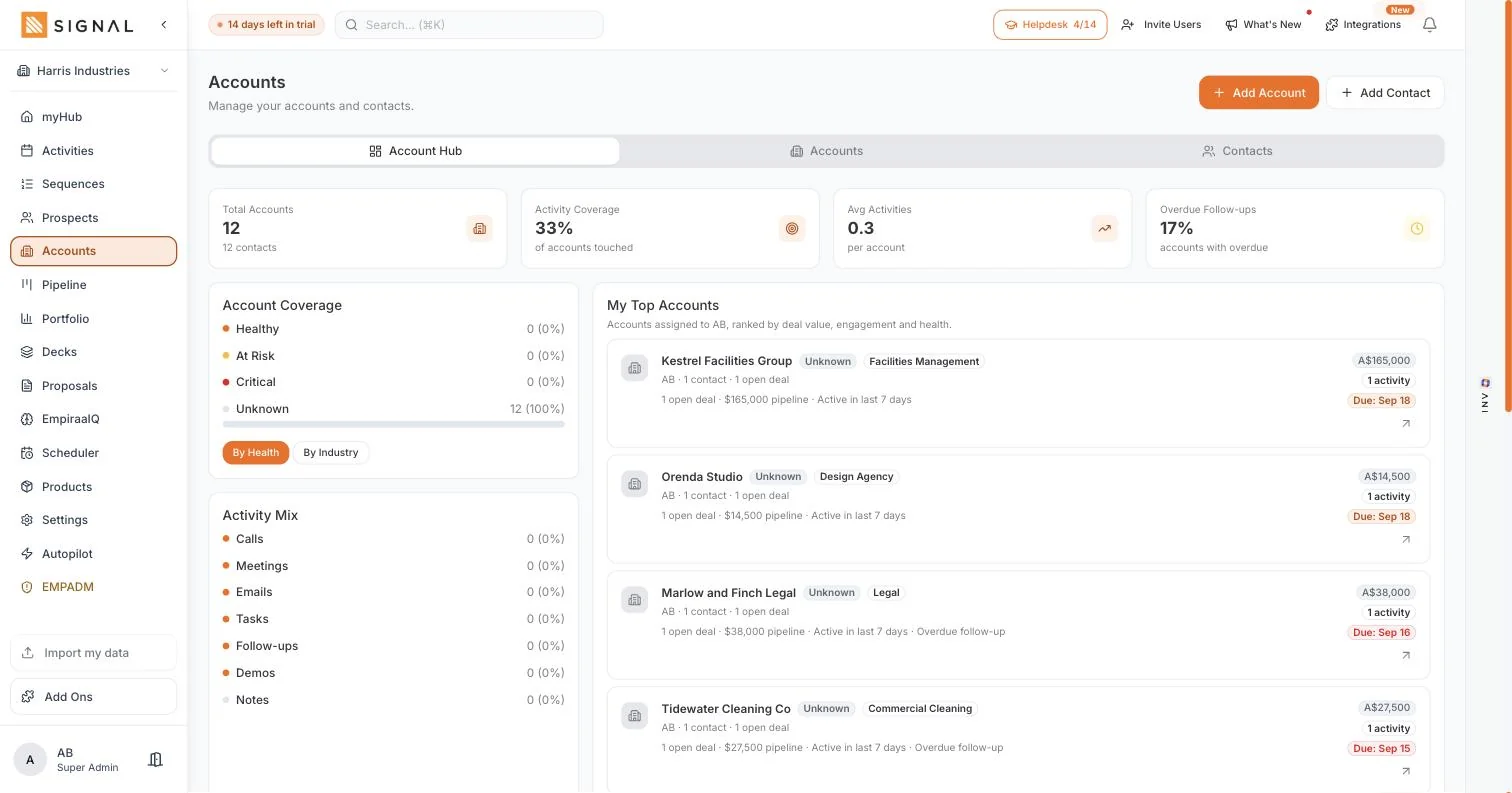
Account Hub: Total accounts, activity coverage, overdue follow-ups, account coverage by health and your top accounts by deal value.
What sales teams use it for
- Picking up an account coldOpen it and read the whole history in a minute, whoever created it.
- Catching a customer going quietCoverage and overdue follow-ups show it months before a renewal does.
- Handing over a patchChange the owner and the history stays exactly where it is.
Everything in Accounts
- One account per company, with as many contacts inside it as it takes
- Industry, territory, owner, health, open deals and annual revenue on the account
- Activity coverage: the share of accounts anyone has touched in the period
- Average activities per account and the share with overdue follow-ups
- Account coverage by health: healthy, at risk, critical or unknown
- Top accounts ranked by deal value, engagement and health
- Activity mix across calls, meetings, emails, tasks, follow-ups, demos and notes
- Every call, email, meeting, note, deal, deck and proposal on the record
- Custom fields, and CSV import and export
Sequences
Outreach that keeps going on the days you cannot.
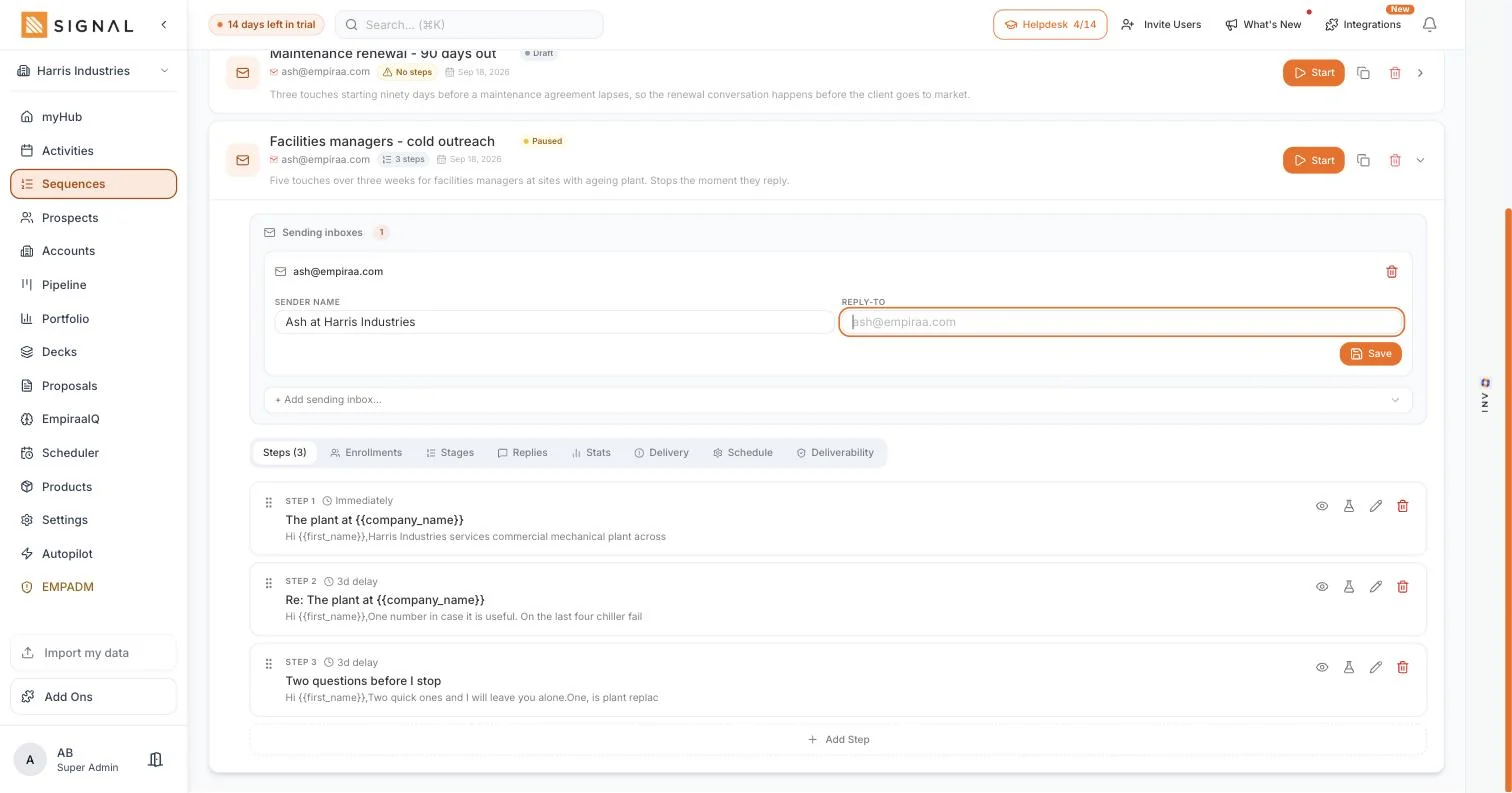
Multi-step email sent from your own connected inbox, with a delay you set between steps and an automatic stop the moment somebody replies. Analytics show sends, replies and deliverability per sequence.
Tabs in Sequences
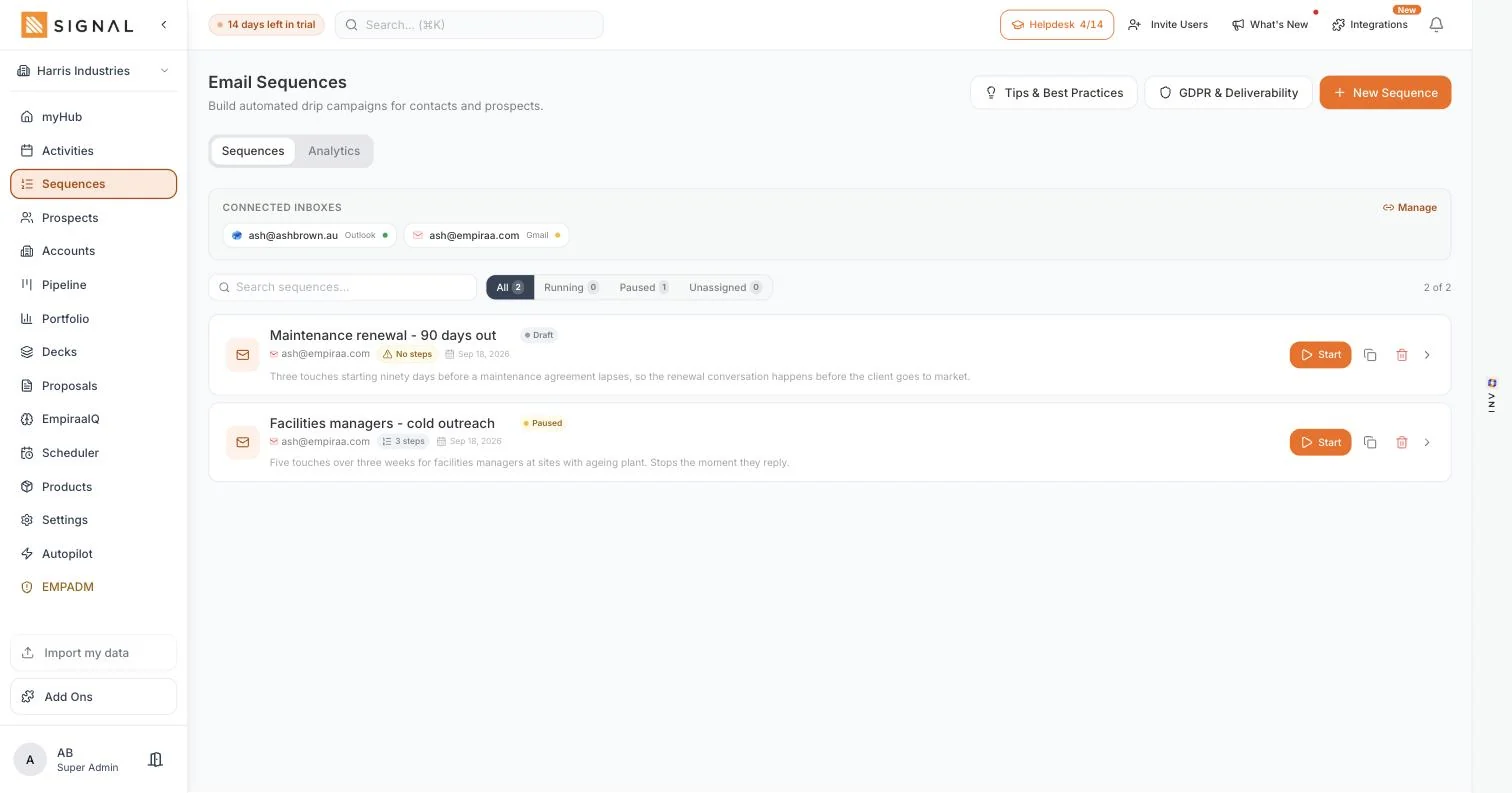
Sequences: Each sequence with its status, the inbox it sends from and how many steps it has.
What sales teams use it for
- Cold outreachThree steps to companies that match your ideal customer, from your own address.
- RenewalsA standing sequence that starts ninety days before an agreement lapses.
- A busy fortnightThe follow-up keeps running while you are on site.
Everything in Sequences
- Connect Gmail or Microsoft Outlook, one inbox or several
- Sender name and reply-to per inbox, so it arrives as you
- Steps with a delay in days and hours, reordered without restarting anyone
- Merge fields for first name, last name, company and job title
- Stops automatically on a reply, a booking or a stage change
- ANI Draft writes a step from your ICP, ANI Polish tightens the one you wrote
- Draft, running and paused states, with enrolment counts
- Delivery and deliverability reporting per sequence
- Enrol from a prospect row, an account, a deal or in bulk from a filtered list
Activities
Calls, meetings and next steps, with overdue first.
One list for the whole day, whatever the channel. Today, upcoming and overdue at the side, the schedule laid out by part of the day, and every row carrying the deal and the person it belongs to.
Views in Activities
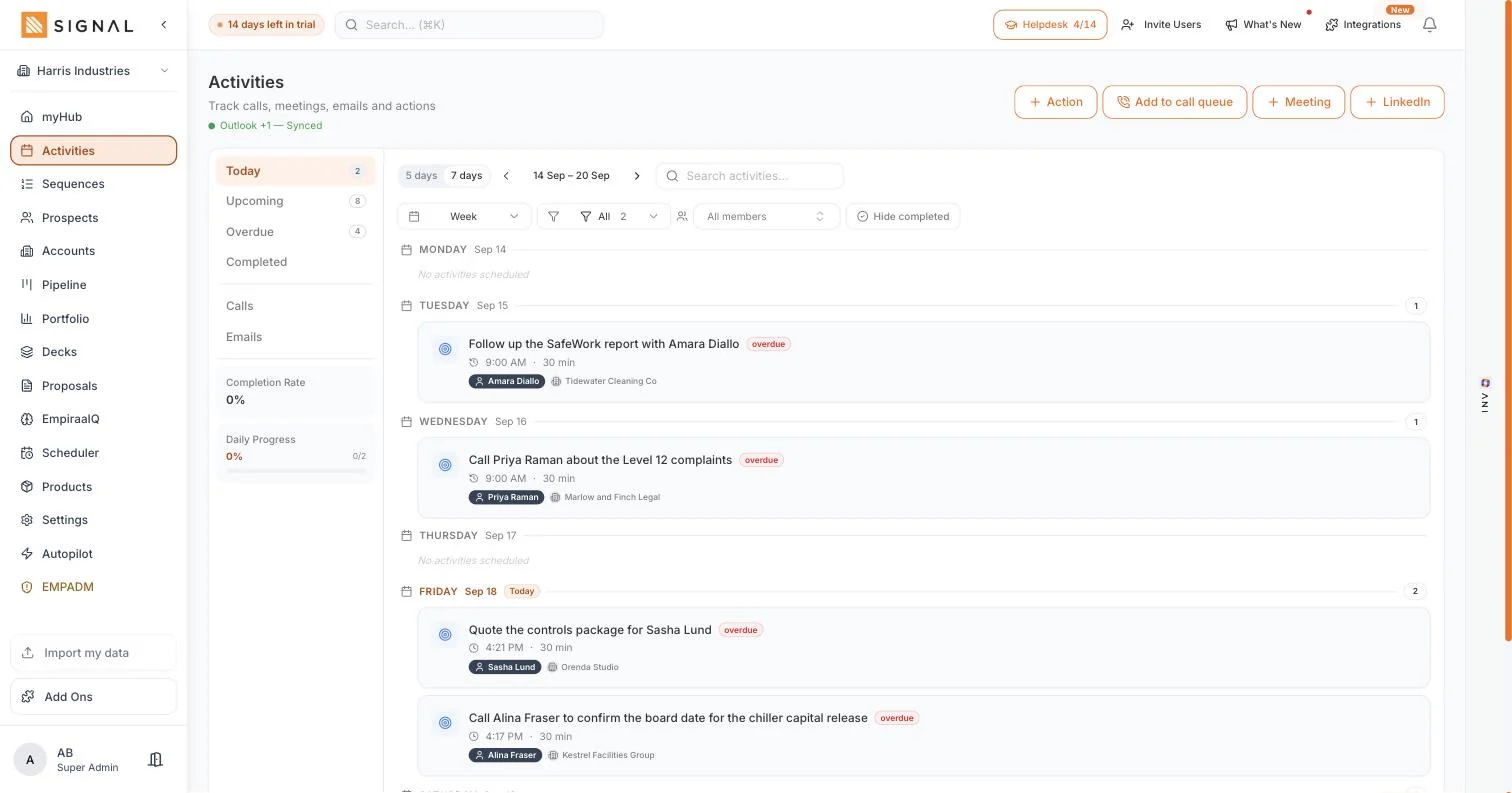
All: A week of calls and follow-ups, each tagged with the contact and the account, overdue marked.
What sales teams use it for
- Working the dayOverdue first, then today. Mark done from the row and the deal updates itself.
- A block of diallingBuild a call queue from a filtered list and work down it.
- Checking the teamFilter by member to see whose follow-up is slipping, without asking.
Everything in Activities
- Calls, meetings, emails, tasks, follow-ups, demos and notes in one list
- Today, upcoming, overdue and completed counts at a glance
- A day view for working and a week view for planning
- The schedule laid out by part of the day, from early morning to evening
- Every row carries its contact and its account
- Add to a call queue, and log a call, a meeting or a LinkedIn touch
- Filter by member, by type, or hide completed
- Completion rate and daily progress
- Calendar sync, so meetings land in your diary and bookings land here
Scheduler
Send a link and let them pick the time.
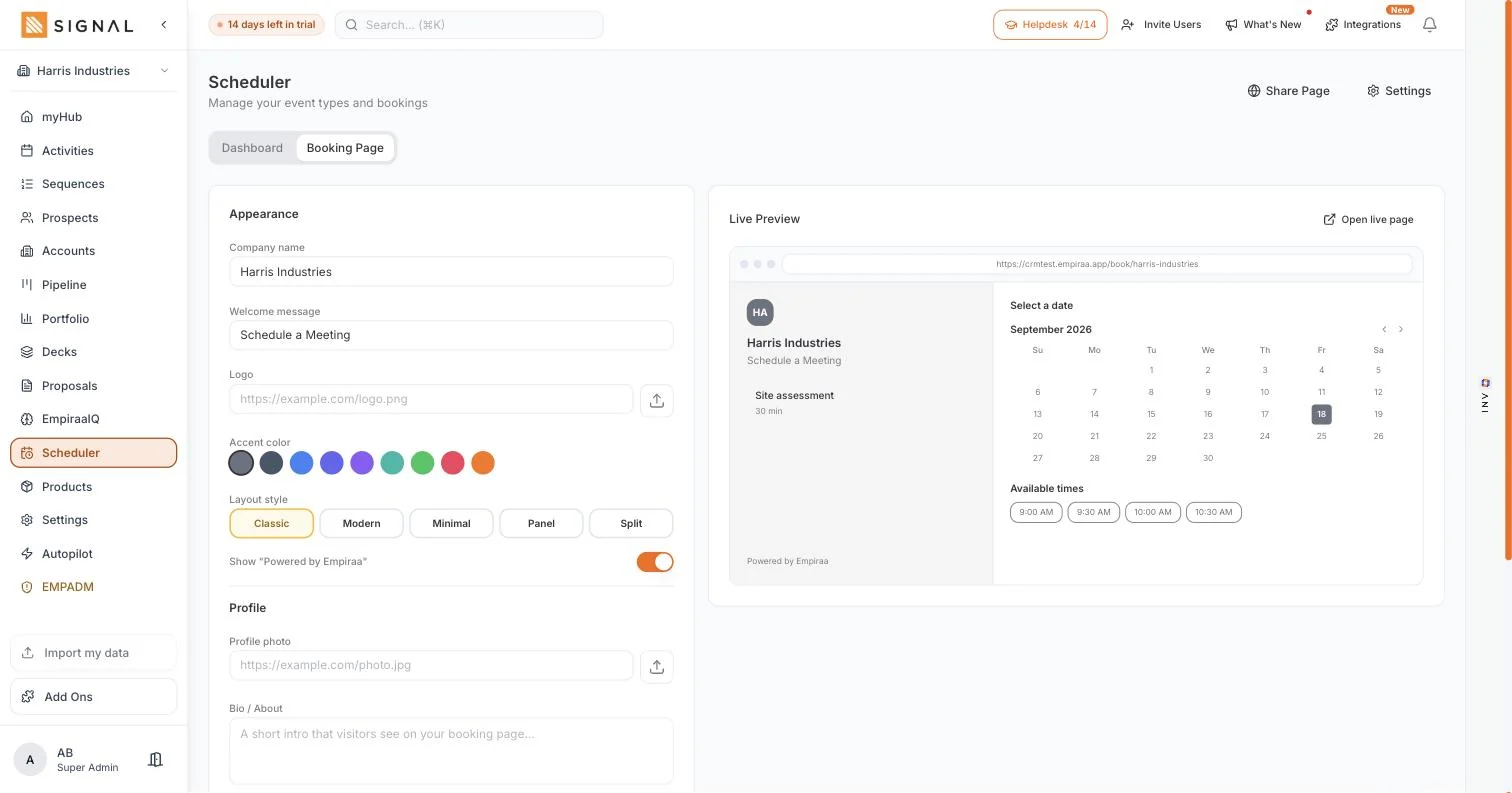
Your own booking page on your own event types and real availability. A booking creates the meeting against the deal, ends any sequence that person is in, and can create the Teams or Zoom link at the same time.
Tabs in Scheduler
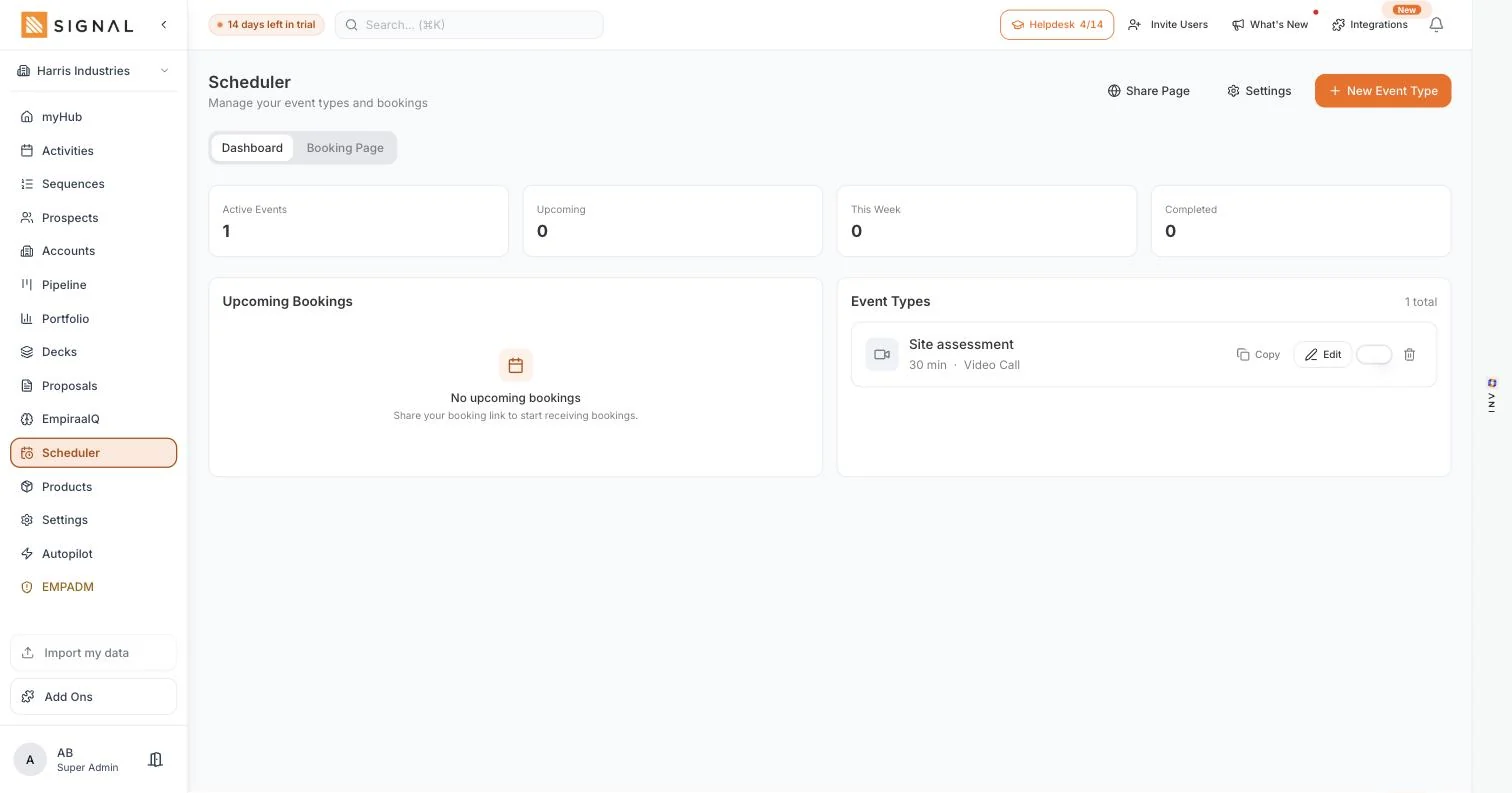
Dashboard: Active event types, upcoming bookings and a thirty-minute site assessment.
What sales teams use it for
- Booking a site visitSend the link from a sequence or an email signature and stop arranging by email.
- Intro callsA fifteen minute event type with its own availability.
- Cutting no-showsReminders a day before and two hours before, then a thank-you after.
Everything in Scheduler
- Your own booking page: company name, welcome message, logo and accent colour
- Five page layouts, from a classic side-by-side to a single column
- Event types with their own duration and meeting type
- Working hours and availability you set
- Google Calendar and Microsoft Outlook, with events created on booking
- Teams meetings from an Outlook booking, and Zoom when it is connected
- Reminders 24 hours and 2 hours before, and a thank-you 15 minutes after
- Upcoming bookings in one list
- The booking lands on the deal and stops the sequence
Pipeline
Two numbers, and one of them is the truth.
Deals on a board or in a list, with a probability on every stage so the weighted forecast means something. Each card shows amount, company, close date and how long since anything happened on it.
Tabs in Pipeline
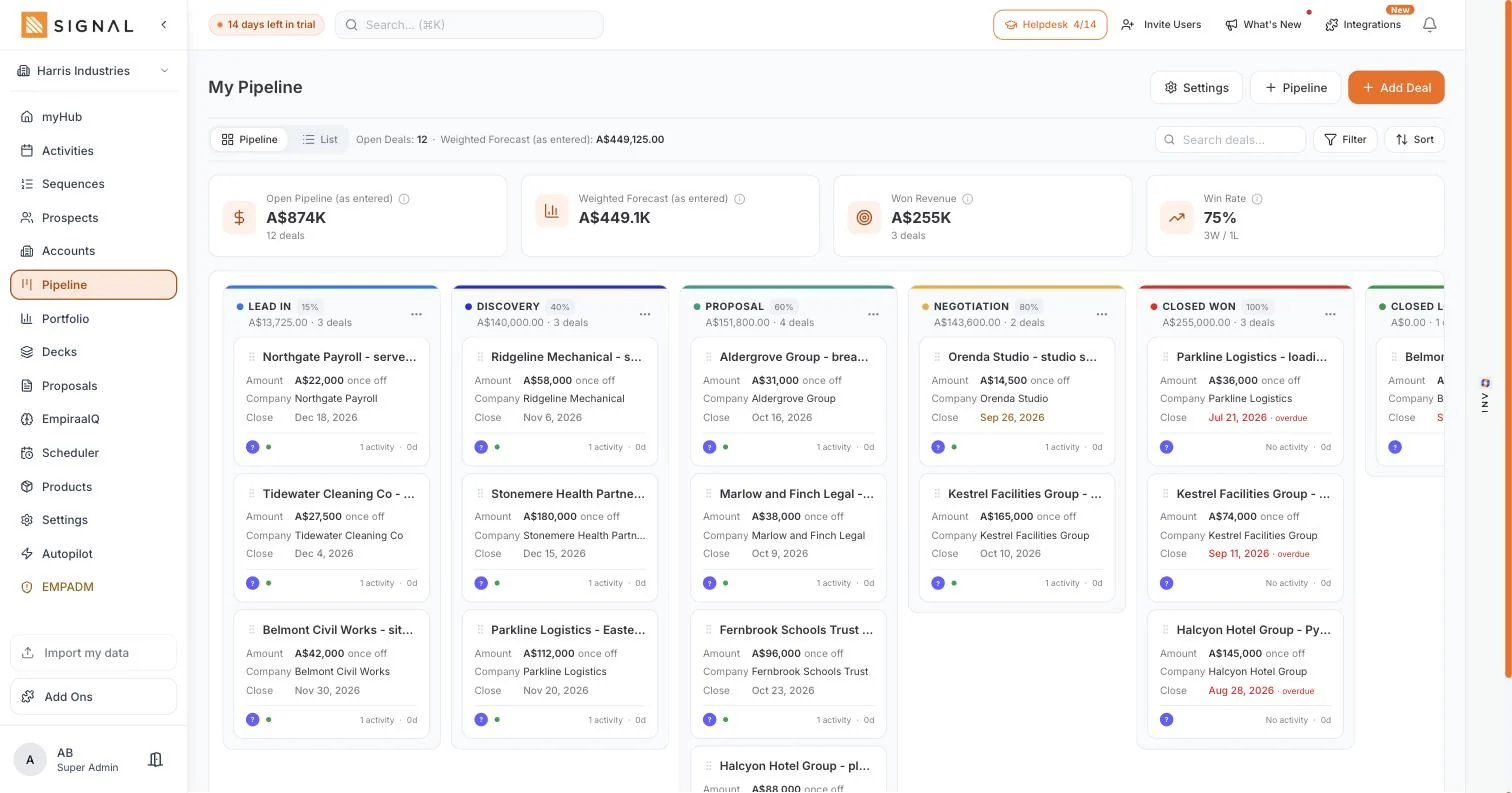
Pipeline: Deals across lead in, discovery, proposal, negotiation, closed won and closed lost, with the value and probability on each column.
What sales teams use it for
- The weekly reviewFilter for at risk and no next step and the agenda writes itself.
- Updating as you goDrag a card and the forecast moves with it. That is the whole of pipeline hygiene.
- Forecasting the monthOpen pipeline and weighted forecast side by side, above the board.
Everything in Pipeline
- Board and list views of the same deals
- Lead in, discovery, proposal, negotiation, closed won and closed lost out of the box
- Rename the stages, reorder them and set the probability on each
- Open pipeline, weighted forecast, won revenue and win rate above the board
- Amount, company, close date, activity count and days since last touch on every card
- Filter and sort, including my deals, at risk, no next step and closing soon
- Several pipelines when you sell more than one thing
- Line items from your product catalogue on the deal
- Contacts, activities, notes, decks, proposals and ANI insight on the deal record
Deck Hub
Build it, send it, see who read which page.
Sales decks built from the deal and sent as a link rather than an attachment, so you find out who opened it, how long they spent and who they forwarded it to.
Tabs in Deck Hub
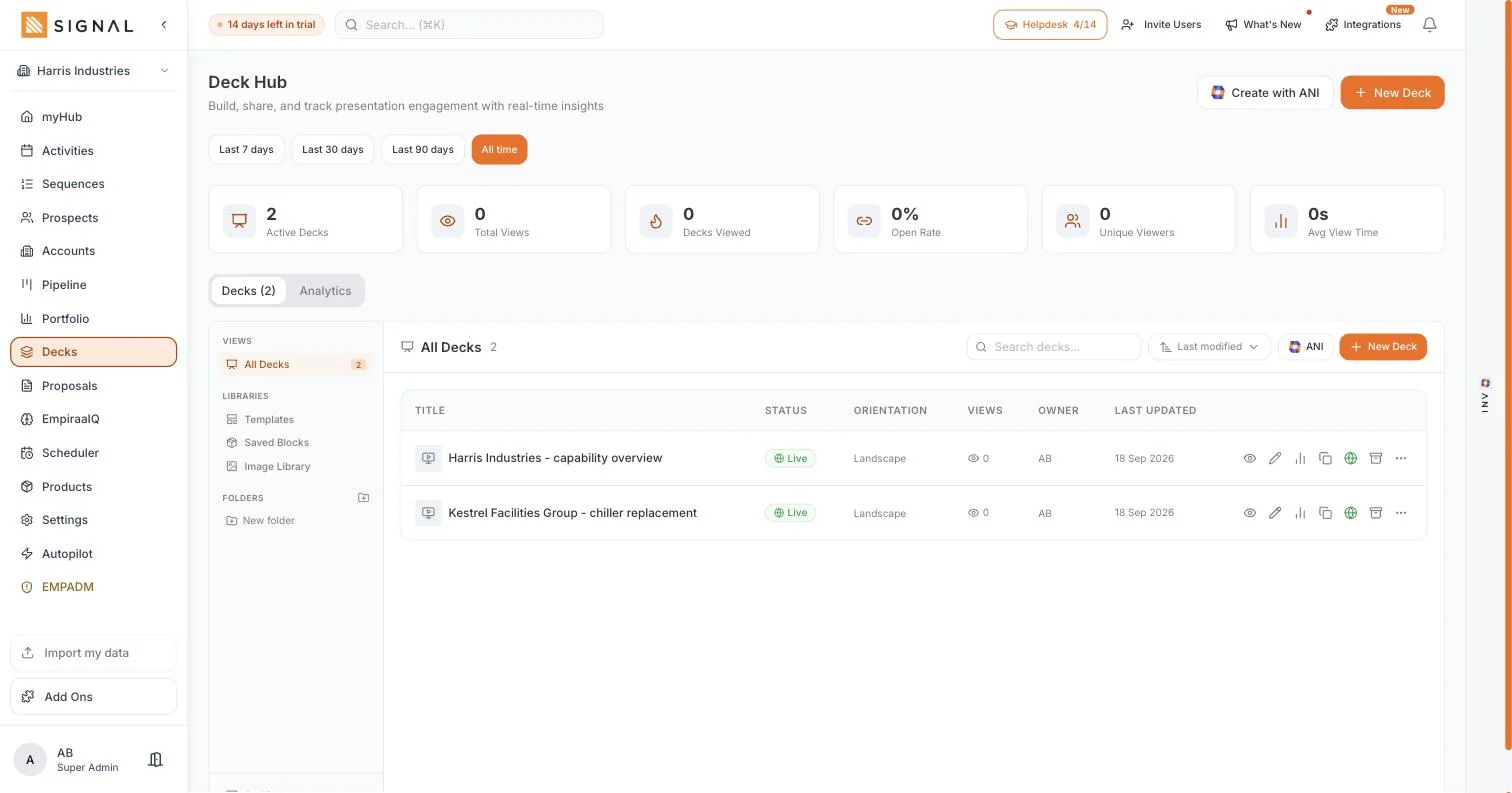
Decks: Active decks, total views, open rate and average view time, with every deck and its owner.
What sales teams use it for
- A pitch for one accountBuilt from the deal, so the company and the products are already in it.
- Knowing whether to chaseSilence after a send stops being ambiguous.
- Finding the real buyerA forward inside the client usually points at whoever signs.
Everything in Deck Hub
- Decks built from the deal, in landscape or portrait
- Create with ANI for a first version from the account and the deal
- Sent as a link that opens on any device, and updates after sending
- Total views, decks viewed, open rate, unique viewers and average view time
- Per-deck analytics with status and owner
- Templates, saved blocks and an image library
- Folders and archiving
- Every deck attached to the deal it belongs to
Proposal Hub
Priced, sent and tracked, without leaving the deal.
Proposals built from the deal with line items from your own catalogue, sent as a tracked link. The hub shows what is sitting with customers right now and which proposals are being opened.
Tabs in Proposal Hub
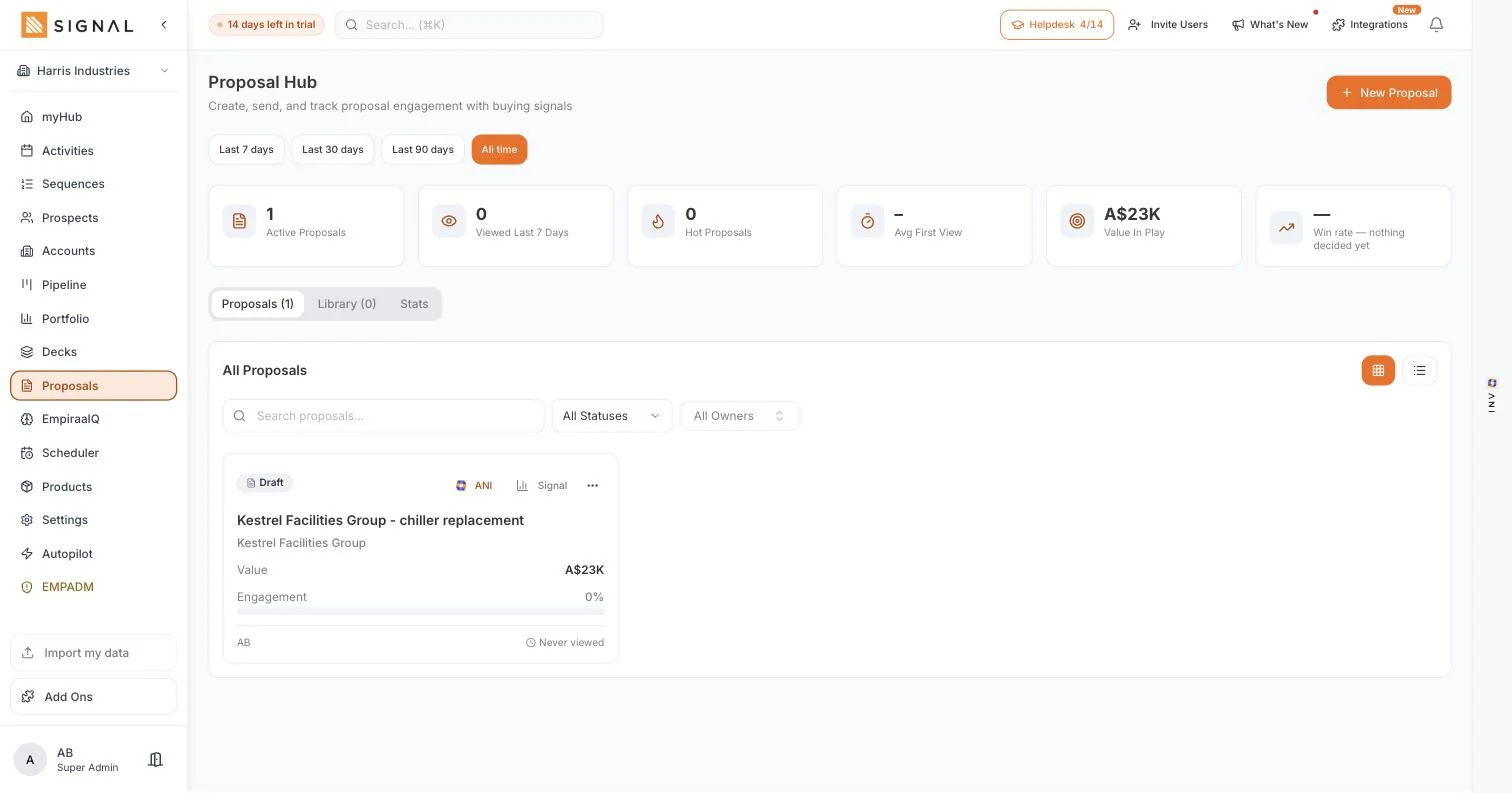
Proposals: Active proposals, what has been viewed, hot proposals, average time to first view and the value in play.
What sales teams use it for
- Quoting the same dayFrom the deal, at your current prices, while the site visit is fresh.
- Timing the follow-upA proposal being opened repeatedly is worth a call that afternoon.
- Watching the monthValue in play is the number that says whether next month is comfortable.
Everything in Proposal Hub
- Line items from your product and service catalogue
- Built from the deal, so the company, contact and value carry across
- Sent as a link that opens on any device and updates after sending
- Draft, sent and accepted states
- Active proposals, viewed in the last 7 days and hot proposals
- Average time to first view, and engagement per proposal
- Value in play across every open proposal
- A library of proposal shapes and saved sections
- Every proposal attached to the deal and the account
Products and Services
What you sell, priced once and used everywhere.
The catalogue behind deal line items, proposals and the forecast. Each entry carries a code, a description, a category and a price, and rate cards and inventory sit alongside it.
Tabs in Products and Services
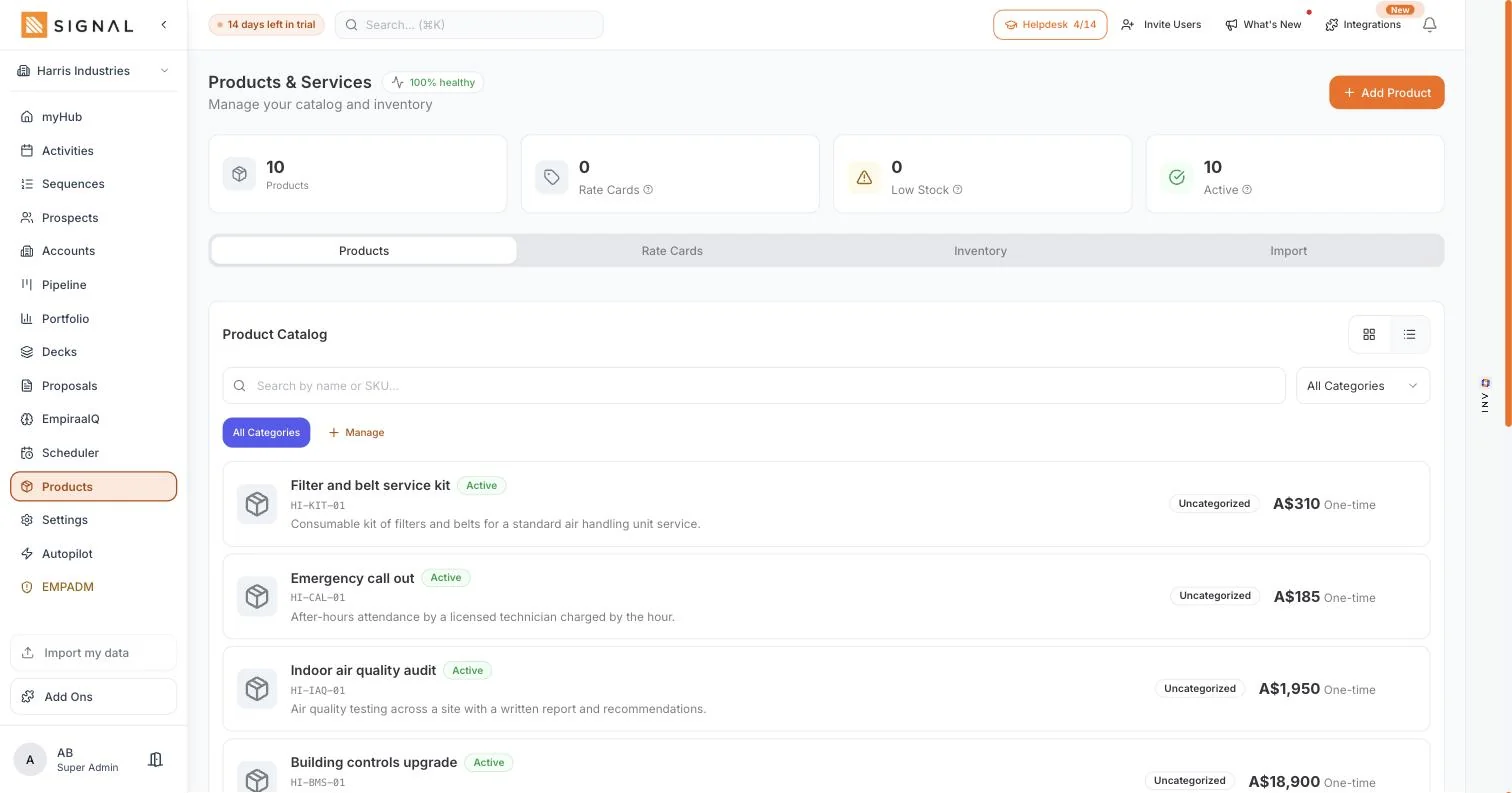
Products: Services and equipment with their code, description, category and price.
What sales teams use it for
- Quoting consistentlyOne price list, so two people cannot quote the same scope differently.
- Putting a rate rise throughChange it once and every new quote uses it.
- Building a deal properlyLine items rather than a single rounded figure.
Everything in Products and Services
- A code, description, category and price on every product or service
- Active and inactive states, and filtering by category
- Rate cards for different customers or contract types
- Inventory with stock levels, reorder points and low stock alerts
- Import a price list from a spreadsheet
- Line items on deals, totalled for you
- Proposals priced from the same catalogue, so the numbers agree
Portfolio
The budget, the forecast, and the gap between them.
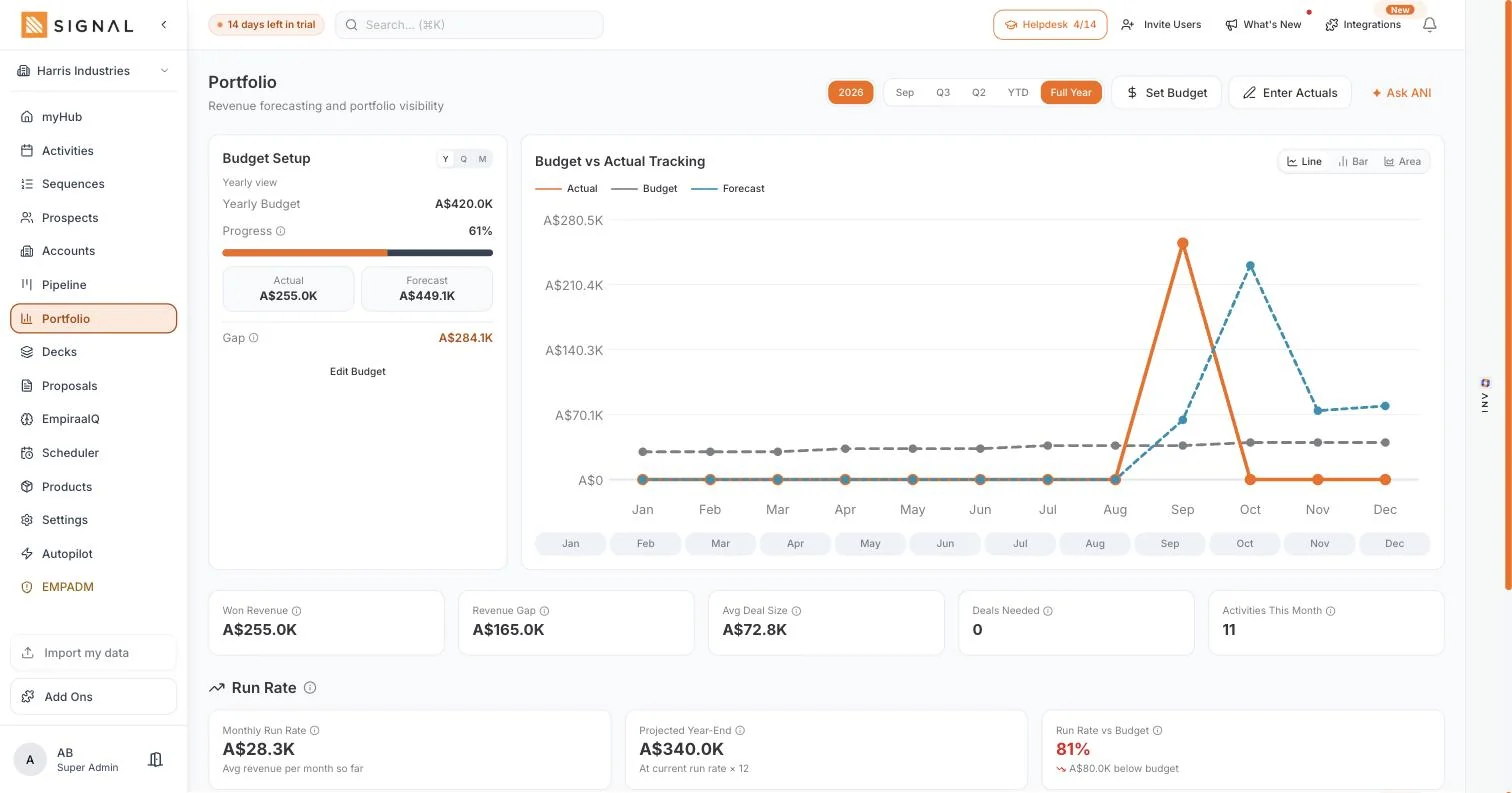
Revenue forecasting against the number you committed to. Yearly budget, actual, weighted forecast and the gap on one screen, with budget against actual by month and run rate underneath.
What sales teams use it for
- The monthly forecastNo spreadsheet to rebuild, because the numbers come from the deals.
- A board or lender meetingEvery figure traces back to a deal, a stage and a date.
- Catching a soft quarterRun rate against budget says where the year lands at today’s pace.
Everything in Portfolio
- Yearly, quarterly and monthly views, with a period picker
- Set the budget and enter actuals
- Yearly budget, progress, actual, forecast and the gap
- Budget against actual by month, as a line, bar or area chart
- Won revenue, revenue gap, average deal size and deals needed
- Monthly run rate, projected year end and run rate against budget
- Proposals and quotes, with combined revenue and no double counting
- Blindspots and focus: no next step, aging deals, zero touchpoint and stalled prospects
- Ask ANI about the numbers on the screen
Empiraa IQ
Ask a question about your own numbers.
The territory, allocation and intelligence side of Signal. Signal 360 puts the state of the business on one screen with an ask box under it, and the other tabs cover territories, allocation, targets, coverage, your ICP and the competitors you meet.
Tabs in Empiraa IQ
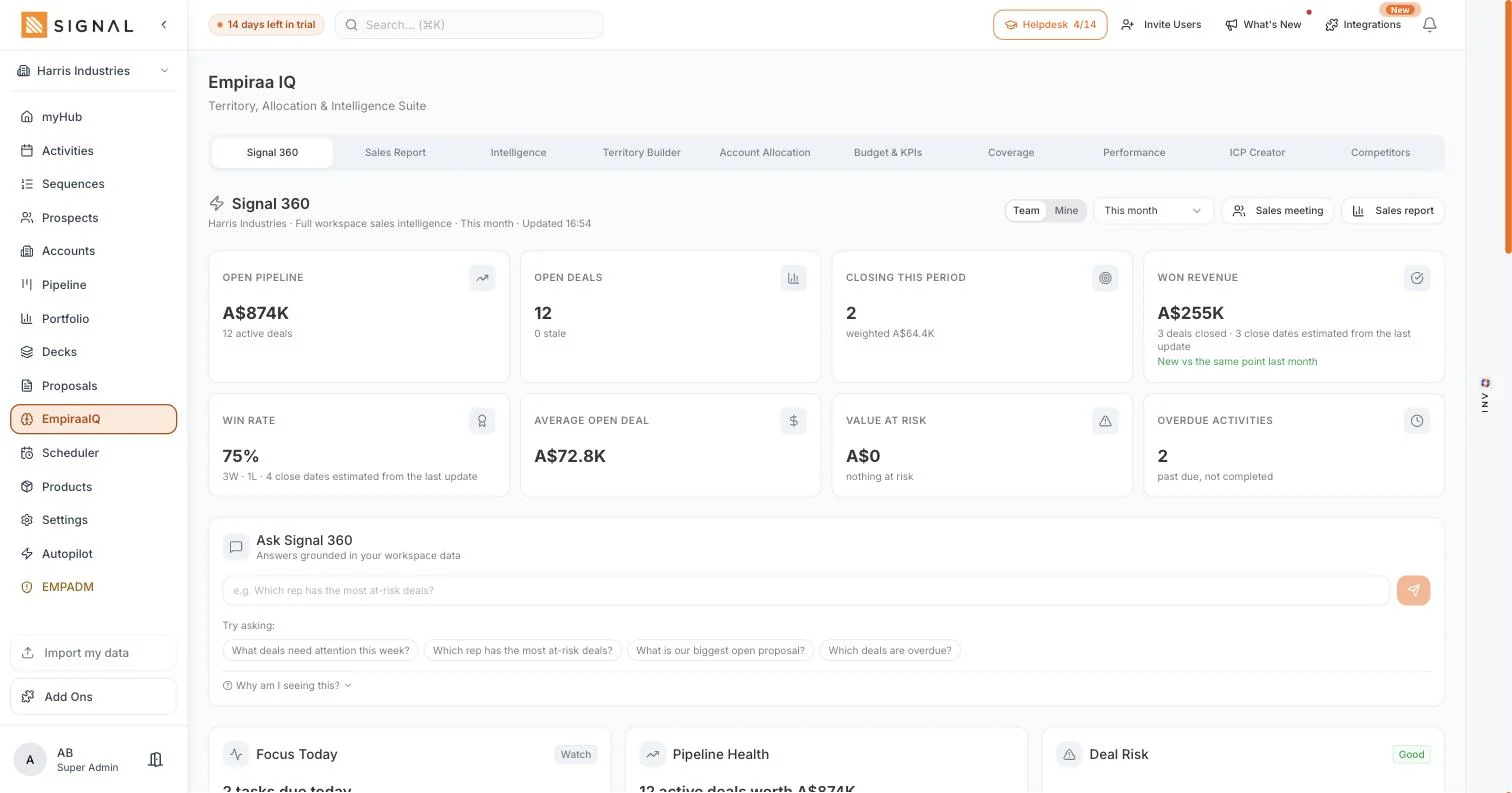
Signal 360: Open pipeline, open deals, what is closing, won revenue, win rate, average deal size, value at risk, and an ask box answering from your workspace.
What sales teams use it for
- A question nobody has time to report onAsk it in plain words and get the answer from your own data.
- Splitting the baseTerritory rules with owners, previewed before you save them.
- Knowing when a deal goes quietAlerts fire when a figure crosses a line you set.
Everything in Empiraa IQ
- Signal 360: open pipeline, open deals, closing this period, won revenue, win rate, average deal size and value at risk
- An ask box answering in plain words from your workspace data
- Focus today, pipeline health and deal risk, each with the reason it is showing
- Pipeline by stage, a rep leaderboard, and targets by week, month or quarter
- Alerts when a figure crosses a line you set, and when a deal goes quiet or a proposal goes hot
- Time in stage, how deals leave each stage, created against closed, and why deals were lost
- Territory builder with rules, coverage type, an owner and a preview of matched accounts
- Account allocation, and coverage across the base
- ICP Creator, with several profiles, target industries, sizes, roles and buying triggers
- Competitors, and a written sales report for a meeting or a board pack
- Controls for what reps can see: colleagues’ figures, and the leaderboard
Autopilot
You decide how much runs itself.
One screen that controls how ANI works across the workspace. Three modes, three approval gates, and an audit trail of everything queued, approved, executed or rejected.
Tabs in Autopilot
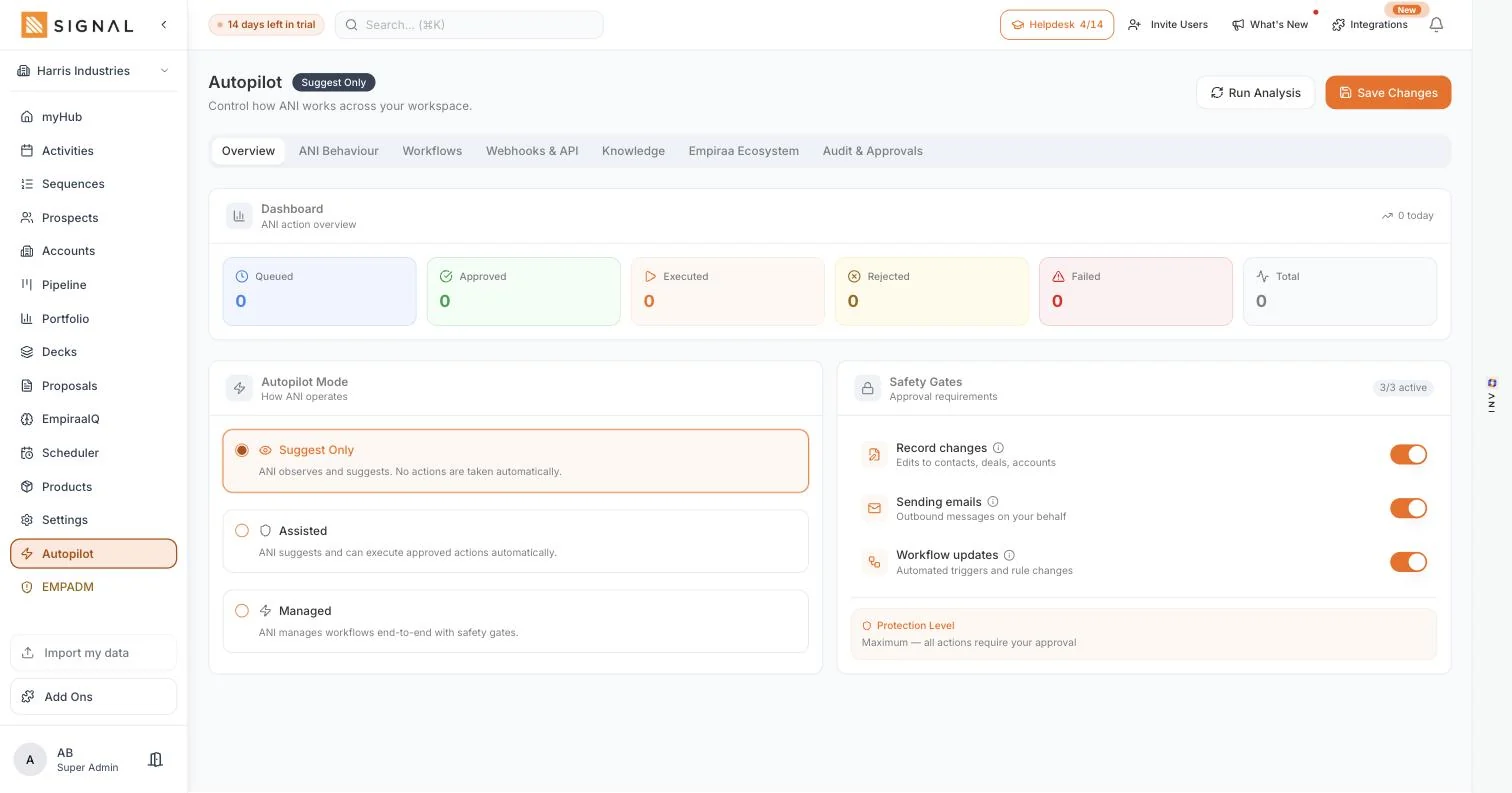
Overview: The three modes, the three safety gates and the protection level they add up to.
What sales teams use it for
- Starting cautiouslySuggest only, which changes nothing and sends nothing.
- Letting the routine runAssisted or managed, with the email gate still on.
- Answering the governance questionOne screen shows exactly what the AI is allowed to do.
Everything in Autopilot
- Three modes: suggest only, assisted and managed
- Approval required for record changes, sending emails and workflow updates, each separately
- A protection level that reflects the gates you have on
- An action overview: queued, approved, executed, rejected and failed
- Audit and approvals, with who decided what
- Workflows, and webhooks and an API for anything not integrated directly
- A knowledge area, so ANI drafts in your business’s terms
- Run analysis, and changes saved deliberately rather than applied as you type
Prefer to click through it in order? Take the Signal tour.
By the job to be done
Start from the thing that is broken.
Every feature exists to move a deal forward. These are the six problems teams bring to Signal.
Common problems
We have nobody to call
Prospect Spark turns a description of your ideal customer into companies with decision-makers on them.
Learn moreWe follow up once and stop
Sequences keep going from your own inbox and stop the moment somebody replies.
Learn moreDeals go quiet and we miss it
Every deal card carries its health and the days since anything happened on it.
Learn moreThe quote takes three days
Proposals are built from the deal at your own prices and sent as a tracked link.
Learn moreThe forecast is a spreadsheet
Portfolio holds the budget, the forecast and the gap, and updates as the team works.
Learn moreWe pay for five tools
Prospect data, sequencing, pipeline, scheduling and proposals are all in one workspace.
Learn moreFind
Work out who to call, without buying a separate tool.
Prospecting and intelligence
Describe your customer, get a list
Prospect Spark takes a description of your ideal customer, in plain words, and finds companies that match, with the decision-makers on them by job title. It runs on a schedule if you want it to, so the top of the funnel fills without you.
- Target geography, industries, company size and roles
- 2,000 fresh prospects a month on the cheapest plan
- Daily Spark emails you the new matches every morning, on by default
Look up one company, and the people in it
Search a business by name and get its profile, then the people who actually decide, with email and phone revealed when you need them. Every reveal lands on a record the whole team can see rather than in a download.
- 250 company look ups and 150 contact reveals a week on Launch
- Metered on the workspace, never per seat
- Call, email, book or sequence from the row
Then keep the whole relationship
An account holds the company, the people in it, and every call, email, deal, deck and proposal. Activity coverage tells you what share of the base anyone has actually touched, which is the number that catches a customer going quiet before the renewal does.
Reach
Get in front of them, and keep going when the week gets away.
Outreach, follow-up and booking
Sequences from your own inbox
Connect Gmail or Outlook and the emails go out from your address, with your signature and your sending reputation. Each step has a delay you set, and the whole sequence stops the moment somebody replies.
- Merge fields for name, company and job title
- Stops on a reply, a booking or a stage change
- ANI drafts a step, or tightens the one you wrote
One list for the whole day
Calls, meetings, emails and next steps in one place, with overdue in front of you rather than buried in a filter. Every row carries the deal and the person it belongs to, so one screen is enough to make the call.
A booking link that writes back to the deal
Your own booking page, your event types and your real availability. When somebody books, the meeting lands on the deal, the follow-up is created and the sequence chasing them stops.
Close
Everything that turns a conversation into a signature.
Pipeline, decks and proposals
A stage is a probability, not a folder
Every stage carries a probability, so moving a card changes what the pipeline is worth. Open pipeline and weighted forecast sit above the board, and each card shows how long since anything happened on it.
- Board and list views of the same deals
- Your own stages, renamed and reordered
- At risk when the close date passes or nothing happens
Decks and proposals, built from the deal
Both start with the company, the contact and the products already in them, both are sent as links rather than attachments, and both tell you when they are opened. Value in play shows what is sitting with customers right now.
- Views, open rate and average view time per deck
- Engagement per proposal, so the follow-up is timed
- Line items from your own catalogue at current prices
One price list behind all of it
Services and equipment with a code, a category and a price, plus rate cards and inventory. It is the least exciting screen in Signal and the one that stops a quote and a forecast disagreeing.
Run the team
What the person carrying the number needs to see.
Forecasting, IQ and Autopilot
Forecasting
Yearly budget, actual, weighted forecast and the gap on one screen, with budget against actual by month and run rate underneath.
Explore forecastingEmpiraa IQ
Signal 360 and an ask box that answers from your own workspace, plus territories, allocation, targets, coverage and your ICP.
Explore Empiraa IQTerritories and coverage
Ownership by rule with a preview of what it catches, and both coverage numbers: enough pipeline, and a base actually being worked.
Explore territoriesAutopilot
Three modes and separate approval gates for record changes, sending email and workflow updates. It starts on the cautious one.
Explore AutopilotConnect
Keep the inbox, the calendar and the phone system you already use.
Integrations
Gmail and Microsoft Outlook, so outreach goes from your own address.
Calendar
Google Calendar and Outlook, with the event created when somebody books.
Meetings
Teams from an Outlook booking, and Zoom for scheduled appointments.
Voice
Twilio with your own account, including the browser dialler and a recording policy.
Notifications
Microsoft Teams channels and Slack channels or direct messages.
The rest
Meta Lead Ads, QuickBooks, Mailchimp, Brevo, webhooks, an API, and CSV in and out.
Next steps
Everything you need to decide.
Feature by feature
Prospect Spark
Companies matching your ideal customer, with the decision-makers on them.
Learn moreSales intelligence
Look up a company and reveal the people who can say yes.
Learn moreAccounts and contacts
The whole relationship on one record, plus activity coverage.
Learn moreSequences
Multi-step outreach from your own inbox, stopping on a reply.
Learn moreActivities and follow-up
Calls, meetings and next steps, with overdue first.
Learn moreScheduler
A booking page whose bookings write back to the deal.
Learn morePipeline
Stages with probabilities, a weighted forecast and deal health.
Learn moreDecks
Built from the deal, sent as links, and you can see them being read.
Learn moreProposals and quotes
Priced from your catalogue, tracked, with value in play.
Learn moreProducts and pricing
One catalogue behind deal values, proposals and the forecast.
Learn moreForecasting
Budget, actual, forecast, the gap and run rate on one screen.
Learn moreEmpiraa IQ
Signal 360, an ask box, and the territory and coverage tools.
Learn moreTerritories and allocation
Ownership by rule, previewed before you save it.
Learn moreTargets and coverage
Whether there is enough pipeline, and whether the base is worked.
Learn moreAutopilot
Three modes and three approval gates on what ANI may do.
Learn moreANI in Signal
Drafting, day planning and answers from your own numbers.
Learn moreBefore you sign up
Take the tour
Click through real screens one step at a time, in about five minutes.
Take the tourSee pricing
Three plans, unlimited users on all of them, every limit on the workspace.
See pricingCompare
Signal beside HubSpot, Apollo, ZoomInfo, Lusha and a spreadsheet.
See the comparisonsIntegrations
The inbox, the calendar and the phone system you already use.
See integrationsQuestions
Feature questions, answered.
Do all the plans get all the features?
Yes. Every plan has every part of the app, including ANI. Plans differ in volume: prospects a month, records, active deals, decks, activities, ANI credits and storage. See the plan limits.
Is Signal a CRM?
Empiraa Signal is a CRM and more. It holds the accounts, contacts, deals and pipeline a CRM holds, and it is also the B2B prospect database, the enrichment, the email sequences, the booking link and the proposal tool. Six subscriptions worth of software in one system, with unlimited users. Signal beside HubSpot.
Are these real screens?
Yes. Every screen on this page comes from a working Signal workspace. The company on them is invented so no real customer appears, but the app is the one you get.
How many users do I get?
Unlimited, on every plan. Every limit is metered on the workspace rather than per seat, so hiring does not change what you pay and nobody has to share a login.
Can I bring my data across?
Yes. Accounts, contacts, prospects, deals and your price list all import from CSV, and ANI maps the columns whether the file came from HubSpot, Pipedrive, Salesforce or a spreadsheet. Switching from HubSpot.
How much can the AI do on its own?
Exactly what you allow. Autopilot has three modes and separate approval gates for changing records, sending emails and updating workflows, and it starts on the cautious setting. How Autopilot works.

Question not answered here? Ask ANI and get a straight answer.
See it on your own numbers.
14 days free. No credit card. Unlimited users from the first minute.